
The IKEA TRADFRI motion sensor is a versatile and affordable device that integrates seamlessly into your smart home zigbee setup. I personaly use them in a cuple of places, in the postbox to notify me on new mail and in some rooms to switch on the light. However, its reliance on tow CR2023 coin cells can be a bit of a drawback. These small batteries, while compact, tend to have a relatively short lifespan, especially in devices that see frequent use. Further more in my use cases a small form factor is not needed, so I decied I’m tired of frequently replacing the coin cells. My solution is replacing the CR2023 cell with AA batteries.
Posts
Extending the Battery Life of Your IKEA Motion Sensor: Replacing CR2023 Cells with AA Batteries
More ...
Unlocking Time: Harnessing the power of temporal tables in SQLite
SQLite is a remarkable, versatile and widely adopted embedded relational database. SQLite’s lightweight nature, ease of integration and broad cross-platform support make it a go-to choice for developers seeking an efficient solution for storing data. Also, SQLite is very capable, but some features aren’t included out of the box. One of those not-included features is temporal tables. What that feature is, why it’s useful, and how to get it working with SQLite will be described in this post.
What are temporal tables?
Temporal tables, also known as temporal data tables, are a feature in database systems that allow you to keep track of states of data over time. These tables store historical versions of data, providing a way to query and analyze how data has evolved over different points in time. A mechanism to fly back in time, so to speak. Such a feature is especially useful when handling data that does not only consist of immutable facts, but also data that is mutable or somewhat mutable. There is more mutable data than one might think. Let’s look at an example, a table of employees:
Modern TLS Version for dovecot & postfix
(TLS 1.2 or newer)
You can use the following settings to ensure that Dovecot and Postfix use a modern TLS version:
For Dovecot:
- Open the file /etc/dovecot/conf.d/10-ssl.conf (Debian).
-
Uncomment the line starting with
ssl_min_protocoland set it tossl_min_protocol = TLSv1.2.
For Postfix:
- Open the file /etc/postfix/main.cf (Debian).
-
Add the following directive:
smtpd_tls_mandatory_protocols = !SSLv2,!SSLv3,!TLSv1,!TLSv1.1.
Finally, reload Postfix with systemctl reload postfix and restart Dovecot with systemctl restart dovecot.
Setting up timesync via NTP on debian & raspberry pi
I use systemd-timesyncd to keep the system time up to date on my raspi / debian system.
To do so i did the following steps:
1. Check the state of timedatectl
Therefore type the comand timedatectl to the shell.
The output should look something like this:
Local time: Fr 2023-01-06 19:34:27 CET
Universal time: Fr 2023-01-06 18:34:27 UTC
RTC time: n/a
Time zone: Europe/Berlin (CET, +0100)
System clock synchronized: no
NTP service: n/a
RTC in local TZ: no
The important part is “System clock synchronized: no” and “NTP service: n/a“. This tells us that there currently is no timesyncing via systemds timedatectl.
2. Install systemd-timesyncd
Erase ESP – quickly reset the wifi chip
TLDR:
Install esptool.py
pip3 install esptool
Erase flash of the esp
esptool.py -- erase_flash
One of my smart ESP devices wasn’t responding after a power down.
I debugged the problem by connecting it to a serial interface. On the comandline I saw that the chip wasn’t able to connect to its WIFI. To check wether the chip was fried or if its just the software thats messing around I had to delete all of its storage, to reflash the software afterwards. To do that i used the comands stated above.
Limoncino Sprizt – Ligurien im Glas – ein leckeres Sundowner Getränk

Zwischen Bergen und Meer, auf kleinen Straßen die sich an den Hängen von Bucht zu Bucht winden. Wo sich die kleinen Orte bunt vom Meer den Hang hinauf winden. Hier wo die Zitronen blühen, hier in Ligurien, hier kommt er her der Limoncino. Er ist der nördliche Bruder des Limoncello, der eher an der Amalfi Küste und in Sizilien zu hause ist.
reset your philips hue lightstrip without a dimmer switch – using deconz / conbee
To reset your philips hue lightstrip philip recomends using their dimmer switch.
If you don’t have it or just are to lazy to use it you might also reset / repair the strip using deconz.
To do so you need to use the deconz touchlink api (described here):
First step is to search for touchlink devices, its done by:
POST /api/<apikey>/touchlink/scan
Afterwards the result is queryed by
GET /api/<apikey>/touchlink/scan
The result will look something like this
Mach’s Förnuftig – Ikeas Förnuftig smart machen
Förnuftig was?
Förnuftig ist der neue Luftreiniger von Ikea und als solcher hat er mein Interesse geweckt. Aber scheinbar anders als viele Andere finde ich das Gerät nicht interessant um Viren aus der Luft zu filtern, dazu eignet er sich wohl auch nicht. Mir geht es eher um größere Verunreinigungen wie Pollen, Staub o.ä. das sich in der Luft tummelt.
So weit so gut, der Haken: Förnuftig lässt sich von Hause aus so gar nicht ins Smart Home integrieren. Das Gerät hat als Interface lediglich einen Drehschalter mit den Stuffen „Aus“, 1, 2 und 3. That’s all.
Für mich ist hier die Challenge dies zu ändern, denn natürlich möchte ich den Filter am liebsten laufen lassen wenn mich der „Krach“ nicht stört. Und natürlich auch nicht dauerhaft sondern vielleicht in Intervallen. Oder z.B. dann wenn der Staubsauger fährt und Staub aufwirbelt. Und wer weiß was mir sonst noch so einfällt.
Es muss also eine digitale Steuerung ans Gerät.
Abkürzung – der einfache Weg
Der erste Gedanke in Richtung smarte Steuerung war schon da vor dem Gerät:
Entsprechend simpel ist er: Eine schaltbare Steckdose.
Dank des analogen Drehschalters “merkt” sich der Luftfilter seinen Zustand auch ohne Strom. Mit einer schaltbaren Steckdose lässt sich also sehr einfach zwischen “Aus” und der am Gerät eingestellten Stufe umschalten.
Ich hab hier einfach zu einer Steckdose mit Tasmota Firmware gegriffen,
zum einen weil ich sie da hatte, zum anderen da diese sich super ohne Cloudanbindung nutzen lässt.
Die Umsetzung ist einfach, Zwischenstecker rein, fertig, aber die Möglichkeiten sind es leider auch. Die schaltbare Steckdose kann also nur ein erster Schritt sein. Deshalb hab ich mir als nächstes das Innenleben angesehen.
Aufschrauben
Wenn man die Stoffbespannung und den Filter aus dem Gerät entfernt, offenbart sich der Förnuftig als schlichter, in meinem Fall schwarzer Kasten.
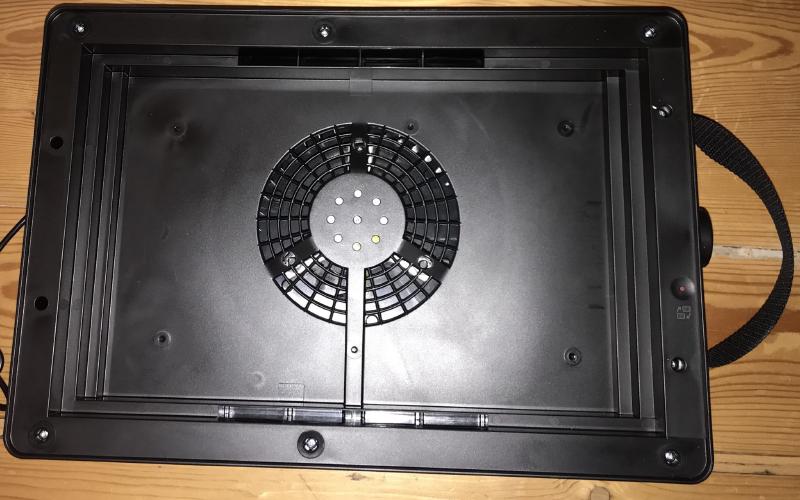
Dabei wirkt das Plastik aus einem Guss, abgesehen von einem Streifen an der Oberseite, der sich auf der Unterseite zum Drehknopf befindet und in dem sich der kleine rote Knopf befindet.
Interessanterweise ist dieser Plastikstreifen mit “normalen” Philipps Schrauben befestigt, wohin gegen die restlichen Schrauben ein Dreiecks-Profil aufweisen.
Nach dem Lösen der beiden Schrauben kann der Plastikstreifen nach oben abgehoben werden. Darunter offenbart sich ein Teil der Elektronik.
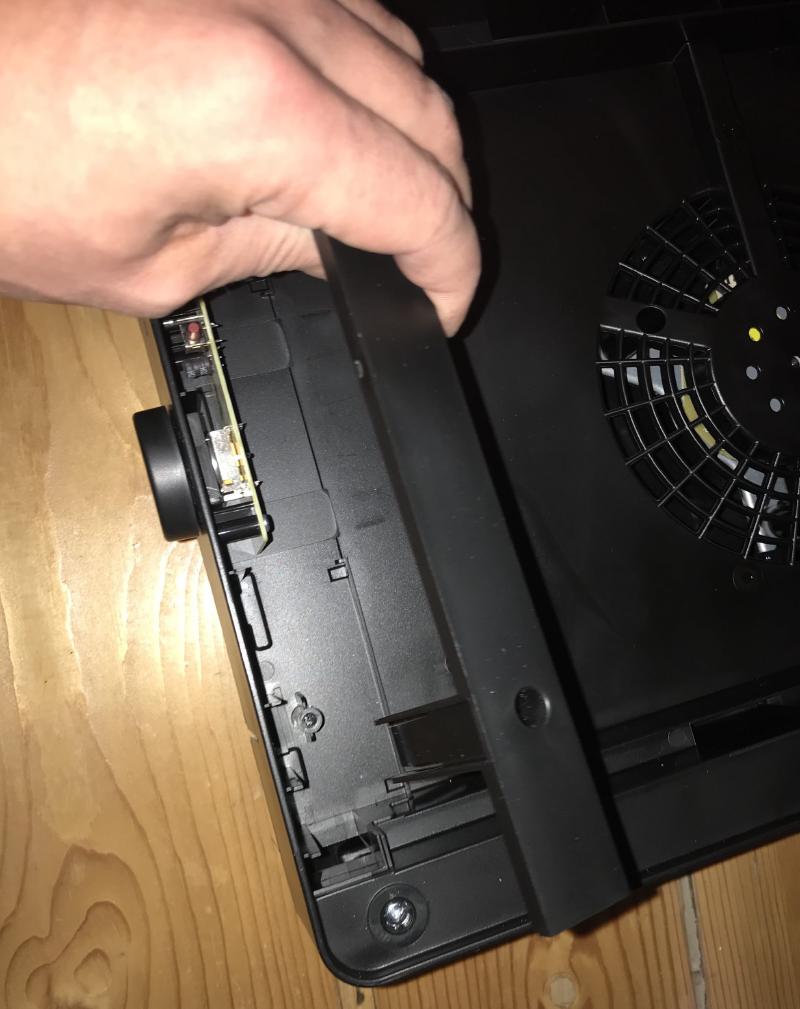
Zum Vorschein kommt eine kleine Platine. Netterweise ist sie nicht überkomplex, hat nur einen Layer und der ist auch schön beschriftet.
Mariannengraben
Etwas fremdes,
etwas unbekanntes,
etwas unwirkliches,
das in die Welt stolpert wie eine nächtliche Begegnung auf einem Friedhof.
Surreal, schimmernd, bunt schillernd
wie Öl in einer Regenpfütze zeichnen sich die Bilder aus Worten.
Bild für Bild entspinnt die Geschichte,
aus der Pfütze wird mehr.
Und als das Ende da ist,
als die Zeit gekommen ist Abschied zu nehmen,
zeigt sich das aus der Pfütze längst ein Meer geworden ist,
ein Meer so tief wie der Mariannengraben.
Der Friede … sei dein

Der Friede der Wellen des Meeres – sei dein
Der Friede der leuchtenden Sterne – sei dein
Der Friede des Fließens der Lüfte – sei dein
Der Friede der nächtlichen Sterne – sei dein
Der Friede der ruhigen Erde – sei dein
Mögen der Mond und die Sterne dir immer leuchten